Java, ZIPs, and Encodings
A problem at work that starts with zip files erroring out, and ends with me skimming across file specs to justify platform differences.
I’ve uploaded a skeleton Spring project with the involved stuff at this link. Functionality is not guaranteed in any way.
How it starts
For some work at $DAYJOB, I’m writing some Java code to work with archives. Specifically, I need to get the filenames, determine whether there is one overarching folder, and extract the files accordingly.
As a starting point, I write some functions to just scan through all the files listed in the zip. It is to be deployed into some Spring Boot service, but with some reorganizing, the standalone version would look like this:
import java.util.zip.ZipFile;
import java.util.zip.ZipEntry;
import java.util.Enumeration;
import java.io.IOException;

public class Test {
  public static void main(String[] args) throws IOException {
    try (ZipFile zipFile = new ZipFile(args[0])) {
      for (Enumeration<? extends ZipEntry> entries = zipFile.entries() ; entries.hasMoreElements() ;) {
        ZipEntry entry = entries.nextElement();
        System.out.println(entry.getName());
        // Other processing omitted
      }
    }
  }
}
Save this as Test.java, and run it as javac Test.java && java Test /path/to/a/zip/file.zip, and it should print out a list of the files compressed into the file.
I opted to use java.util.zip since it’s a built in component, and our existing project (onto which what I’m writing will be deployed) is already… a bit messy in terms of dependencies.
It works on some quick test zip files I compressed myself, so I got my hands on the real files to be processed. And of course it failed on the earliest chance.
Exception in thread “main” java.util.zip.ZipException: invalid CEN header (bad entry name or comment)
at java.base/java.util.zip.ZipFile$Source.zerror(ZipFile.java:1781)
at java.base/java.util.zip.ZipFile$Source.checkAndAddEntry(ZipFile.java:1255)
at java.base/java.util.zip.ZipFile$Source.initCEN(ZipFile.java:1720)
at java.base/java.util.zip.ZipFile$Source.(ZipFile.java:1495)
at java.base/java.util.zip.ZipFile$Source.get(ZipFile.java:1458)
at java.base/java.util.zip.ZipFile$CleanableResource.(ZipFile.java:724)
at java.base/java.util.zip.ZipFile.(ZipFile.java:251)
at java.base/java.util.zip.ZipFile.(ZipFile.java:180)
at java.base/java.util.zip.ZipFile.(ZipFile.java:151)
at Test.main(Test.java:8)
A quick search on the error turned out not really helpful: most results are concerned with other variations of the ‘invalid CEN header’ error, usually ‘bad signature’ or something related to zip64, neither of which applies to my case. The results that do mention the same error seem to always attribute it to the archive being broken, be it actual file corruption or encoding errors.
Wait, encoding errors? I know that the archive will contain non-ASCII characters in file names (it is these names that we need to extract). Java would stick to UTF-8 by default as far as I know, and I myself do the coding in a WSL2 instance, which is also quite compliant with UTF-8. Windows, on the other hand, is generally consistent but… not the most intuitive in this regard.
With that in mind, the stack trace also indicated something weird: It is not tripping on specific list entries. The call would fail at the construction of the ZipFile. While there indeed are non-ASCII characters in the file list, the name of the file itself and the path leading to it is perfectly ASCII.
Huh.
How it thickens
So I asked my team leader to deploy the same code on their (fully Windows) setup, which resulted in… a different error. While I do not recall the exact error, I know it is able to iterate through the names until it sees a non-ASCII name, where it bailed out complaining about something being MALFORMED.
Yet again, the file is totally valid. Both right-click-extract in explorer and the extract option in 7-Zip produces the file names correctly. Same for unzip in WSL. The -l switch also outputs the file list without issue.
On the code’s side, I tried several other charsets. I know Windows chooses UTF-16 as its main Unicode implementation, but neither LE or BE works. Previous versions of Windows seem to prefer ANSI, which is similar enough to be covered by ISO-8859-11, and it allowed the ZipFile instantiation to go through, only to garble all the non-ASCII characters.
How it depends
As I would like to rule out the problem being with the zip itself (it comes directly from users), I started running my own archives to try to replicate the issue.
My work device has the built-in IME for Chinese Pinyin, so it is trivial to create a file with non-ASCII characters in its name. Here’s some simple Python to create one such file without one.
with open(b'\xe6\xb5\x8b\xe8\xaf\x95.txt'.decode('utf8'), 'w') as f:
    pass
This creates an empty 测试.txt (literally test.txt) file in your current working directory, which we will then compress into a zip.
There are quite some options to compress a file. To stick to the WSL, the CLI call will be zip test.zip 测试.txt2. In Windows, the command line call with 7-Zip is 7z.exe a test.zip 测试.txt. On the graphical side, it’s slightly more complicated on WSL3, but on either that or Windows there are many programs to do the same thing. And in Windows 11 there even is a quick option to compress into some common formats, which includes zip.
Luckily (?), with only the native implementations and 7-Zip, I can already see something happening. All attempts on WSL do not trigger the error, while on Windows 7-Zip does.
Yes, native 7-Zip on Linux4 did not fail. I also took the longer path of running the Windows version via Wine, which… still failed.
How it turns out
At this point I have a few different zip results on the same file. They all decompress back to the same dummy file, so it’s about time to check the metadata.
The tool on Linux is zipinfo, part of the unzip package, at least on my distro. Running this on different zip files revealed the first key to the puzzle:
- A subfield with ID 0x7075 (UTF8 path name) and 15 data bytes. The UTF8 data of the extra field (V1, ASCII name CRC `0a53039c’) are: e6 b5 8b e8 af 95 2e 74 78 74.
This is only present in the file created by Windows 7-Zip. In case you don’t remember the Python command used to write the file name, the first six bytes, e6 b5 8b e8 af 95, are the same as shown here. And yes, 2e 74 78 74 is just ASCII for .txt. In other words, the non-working ones have another field for storing the UTF-8 file names.
However, both working and non-working files report the correct file name in the central directory entry listing, which means there has to be a different field somewhere. Those without the extra field relies solely on that, while the rest can… somehow use both in conjunction?
About time to dive into the ZIP specifications. I ended up landing on this JMU page, which in turn cites PKWare’s official documentation.
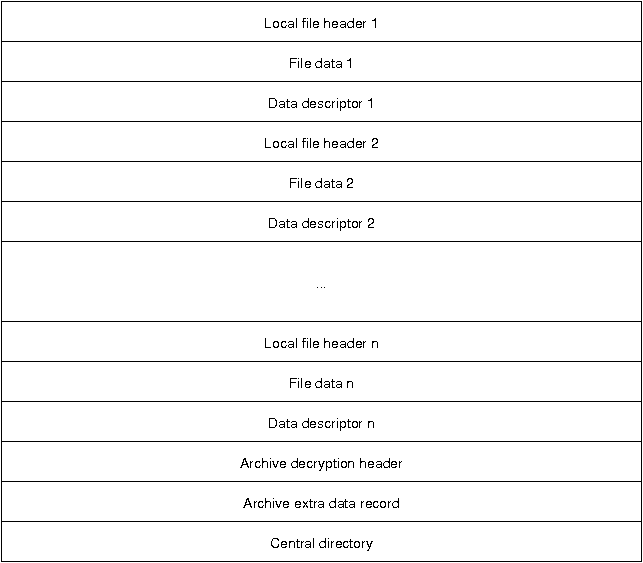
Overall structure of a ZIP file. Original link
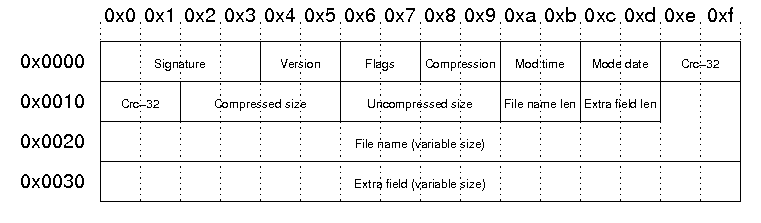
Structure of each local file header. Original link.
These two pictures pretty much sum up all the information around the metadata. On the metadata itself, the point I was looking for showed up as Appendix D.2 in the PKWare spec5:
D.2 If general purpose bit 11 is unset, the file name and comment SHOULD conform to the original ZIP character encoding. If general purpose bit 11 is set, the filename and comment MUST support The Unicode Standard, Version 4.1.0 or greater using the character encoding form defined by the UTF-8 storage specification. The Unicode Standard is published by the The Unicode Consortium (www.unicode.org). UTF-8 encoded data stored within ZIP files is expected to not include a byte order mark (BOM).
The JMU page does call the ‘Flags’ section the ‘general purpose bit flag,’ and its bit 11 is ‘language encoding,’ which also happens to be the title of Appendix D!
Next up, of course, is directly hexdumping the zip files6.
0000000 4b50 0403 000a 0800 0000 6e4e 5b98 0000
0000010 0000 0000 0000 0000 0000 000a 001c b5e6
0000020 e88b 95af 742e 7478 5455 0009 2403 4b7f
0000030 3c69 4b7f 7569 0b78 0100 e804 0003 0400
0000040 03e8 0000 4b50 0201 031e 000a 0800 0000
0000050 6e4e 5b98 0000 0000 0000 0000 0000 0000
0000060 000a 0018 0000 0000 0000 0000 81a4 0000
0000070 0000 b5e6 e88b 95af 742e 7478 5455 0005
0000080 2403 4b7f 7569 0b78 0100 e804 0003 0400
0000090 03e8 0000 4b50 0605 0000 0000 0001 0001
00000a0 0050 0000 0044 0000 0000
0000000 4b50 0403 000a 0000 0000 6e4e 5b98 0000
0000010 0000 0000 0000 0000 0000 0008 0013 e2b2
0000020 d4ca 742e 7478 7075 000f 9c01 5303 e60a
0000030 8bb5 afe8 2e95 7874 5074 014b 3f02 0a00
0000040 0000 0000 4e00 986e 005b 0000 0000 0000
0000050 0000 0000 0800 3700 0000 0000 0000 2000
0000060 0000 0000 0000 b200 cae2 2ed4 7874 0a74
0000070 2000 0000 0000 0100 1800 0700 5ba7 9935
0000080 dc74 0001 0000 0000 0000 0000 0000 0000
0000090 0000 7500 0f70 0100 039c 0a53 b5e6 e88b
00000a0 95af 742e 7478 4b50 0605 0000 0000 0001
00000b0 0001 006d 0000 0039 0000 0000
I’ve highlighted the interesting parts. (I hope the font is readable enough.)
Again, the same UTF-8 sequence, just reversed order between each two pairs since, well, endianness. The file name always starts at position 0x1e, and we can see the left one reporting the correct name while the right one does… something else. Thankfully we still have the 2e74 7874, which survived the cast as ASCII and indicates the end of the file name segment regardless. Both sides would then repeat the name one more time, and then the right side additionally reports the UTF-8 name twice. There’s a (misaligned) 7075 near the end, matching the zipinfo output for a UTF8 path name, confirming that the Windows case utilizes the extra field.
With this knowledge in mind, b2e2 cad4 is not that hard to resolve either7. Did I mention using Chinese? Windows defaults to codepage 9368 for Simplified Chinese installations.
>>> b'\xb2\xe2\xca\xd4'.decode('cp936')
'测试'
Yikes.
What comes after
Now that we have dealt with pretty much everything, the solution is straightforward. A catch for ZipException9 that reconstructs the file with Charset.forName("GB2312") is all I need to make my case work.
Some questions do remain, however.
-
No failure on the same file when I embed the same service function into a JUnit test. In hindsight, my tests are run through Visual Studio Code connecting into the WSL instance, which might have applied its own fallback or some JVM parameter.
-
What can be done to address this from the Windows side. Microsoft probably keeps legacy stuff around for good reason, and I recall seeing some options in region settings around fallback locales. Also, I didn’t find a built-in command line zip generator, but I have a feeling there’s some PowerShell command to do just that…
-
Where 7-Zip stands in this. The latest 7-Zip version still supports everything from Windows 11 to… 2000, so it also makes sense for them to be conservative in this regard. The users that will be generating the archives in my case… won’t be technical, and I have this feeling that more interesting problems will come along the way.
-
Is it a library issue? Apache Commons has their own implementation of both
ZipFileandZipEntry, which explicitly states support for different name encodings, in addition to various other improvements. However, the aforementioned reason to stick to native still stands.